

How do I decode a CAN log file (BLF or ASC) with a DBC file?
With the CAN Import add-in, UniPlot converts Vector BLF and ASC log files into physical signals. You select the DBC files and the messages you need once in a named configuration. Every following import uses that configuration, so a whole series of log files is decoded the same way. The same add-in also reads CAN data from MDF4 bus logging files, G.i.N CAN LOG files and A&D CAN log files.
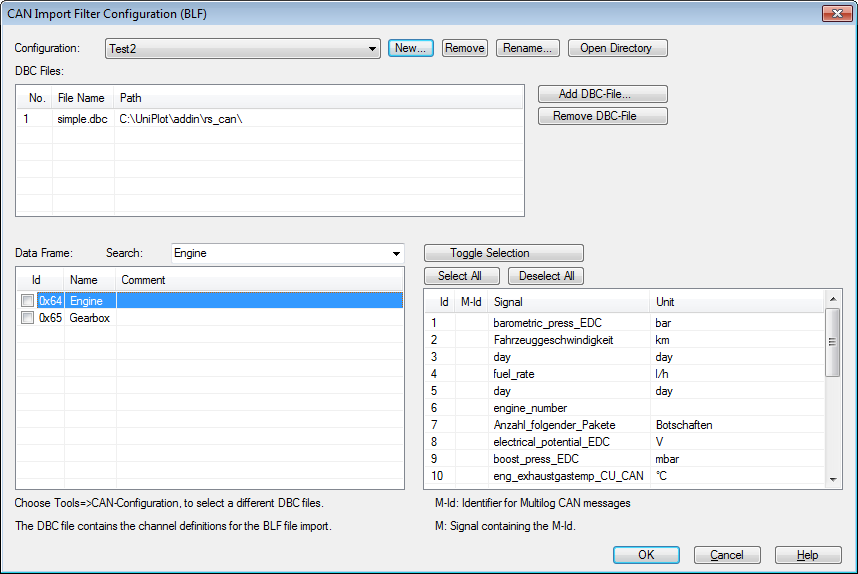
Tools=>CAN Configuration (DBC file): DBC files at the top, messages below, the signals of the selected message on the right.
How it works
Choose Tools=>Add-In Manager, check CAN Import and click OK.
Choose Tools=>CAN Configuration (DBC file) and add one or more DBC files. All their messages are listed. Check the messages you want to import, all signals of a checked message are converted. For each DBC file you can choose a bus number (1 to 255) or “all”.
Save the configuration under a name. The configuration selected when you close the dialog is used for the next imports.
Choose File=>Import Data, set the file type to
Vector CAN Log (*.blf; *.asc)and select one or more log files.To plot a signal over time, choose the dataset type
2D: y/t "MDF/INCA/CAN/ODS/iFile". UniPlot selects the matching time channel automatically.
In the resulting NC2 file each channel has the signal name from the DBC file,
every message has its own time channel (time, time0, time1, …),
and each channel carries the CAN Id as attribute CanID and the message name
as attribute ssMessage.
In an automation script, select a saved configuration and import:
can_set_active_dbc_configuration("Engine");
ssNC = auto_ImportData("d:/logs/drive_017.blf");
Why it helps
Set up the DBC files and messages once, then import any number of log files without repeating the selection.
Only the messages you need are converted, which keeps the data files small.
Multi-bus recordings stay traceable: the bus number is stored in the attribute
BusNumber, for example “CAN12”.
Good to know
Multiplexed messages are supported; the multiplexer is written to the NC2 file as well.
If a DBC file contains
ProtocolType = J1939, UniPlot extracts the PGN from the extended CAN Id. Multibyte variables are not supported.Vector ASC files are read in classical and CAN FD format (CAN FD since R2022.4). The header (up to 50 lines) is saved as global attributes. In BLF files only classical CAN frames are evaluated, CAN FD frames are skipped.
Only CAN frames are read. The manual marks the add-in as a beta version.
One configuration can contain at most 800 selected messages.
Configurations are XML files in the subdirectory
can_dbc_iniof the UniPlot user directory, so they can be copied to colleagues.Instead of a DBC file you can use an AUTOSAR ARXML file, see Can I decode CAN data with an AUTOSAR ARXML file instead of a DBC?.