

How do I calculate a new channel, for example power, from measured channels?
Use the UniPlot formula interpreter. Type a formula such as
Power = (EngSpd * SAETrq)/9550 and UniPlot adds the channel Power to the
data file. The new channel can be plotted like any measured channel. Registered
formulas are recalculated with one key press, and many formulas can be
maintained in one Excel table.
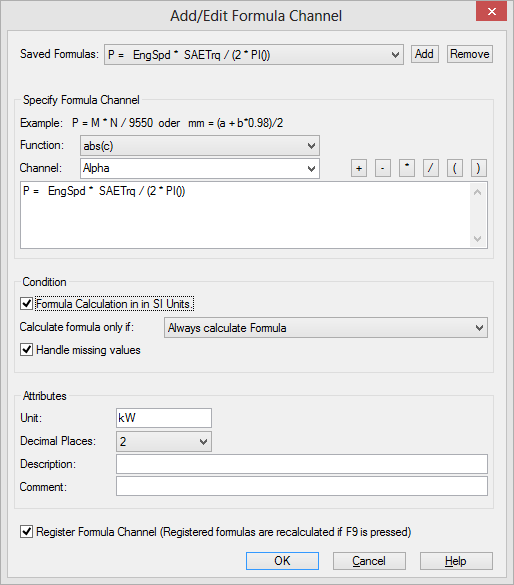
The Add/Edit Formula Channel dialog box: formula, unit, conditions and the option to register the formula.
How it works
Import the data file with File=>Import Data, for example
Test1.xlsfrom the UniPlotsamplesfolder, and click Edit in the Data Browser to open the data grid.Right-click a channel name in the data grid and choose Add/Edit Formula Channel.
Type the formula in the form
NewChannel = Expression, for examplePower = (EngSpd * SAETrq)/9550. Channels, functions and operators can also be picked from the lists in the dialog box.Enter the unit and the number of decimal places and click OK. UniPlot checks the formula, calculates it and adds the channel to the file.
Why it helps
No export to Excel and back: the calculated channel is stored in the data file next to the measured channels.
With Register Formula Channel checked, the formula is saved and evaluated again every time you press F9, for example after values were corrected.
One formula can serve many similar channels:
p_cyl<c>_smooth =
smooth(p_cyl_<c>)
is applied top_cyl_1top_cyl_4.
Good to know
Formulas can use functions such as
abs(),sqrt()orsmooth(), global file attributes (for exampledisplacement = 2000) and constants from a constant table.For MDF, BLF, Famos and ASAM ODS data, channels with different numbers of points can be combined; UniPlot interpolates them to a common time base. For other files all channels in a formula need the same number of points.
With the option for formula calculation in SI units, all channels are converted to SI units before the calculation, so mixed units such as rpm and kW do not need conversion factors.
A formula can be calculated only under a condition, for example only for diesel engines.
Larger sets of formulas are easier to maintain in an Excel formula table, see Formula Interpreter 2 - Creating a formula table.