

How do I import CSV, text or Excel measurement files?
Choose File=>Import Data and select the file. UniPlot finds the column separator, the decimal sign, the channel names and the units by itself and converts the file once into a UniPlot data file. After that the channels are listed with their units and can be plotted by drag and drop. No import template and no add-in is needed.
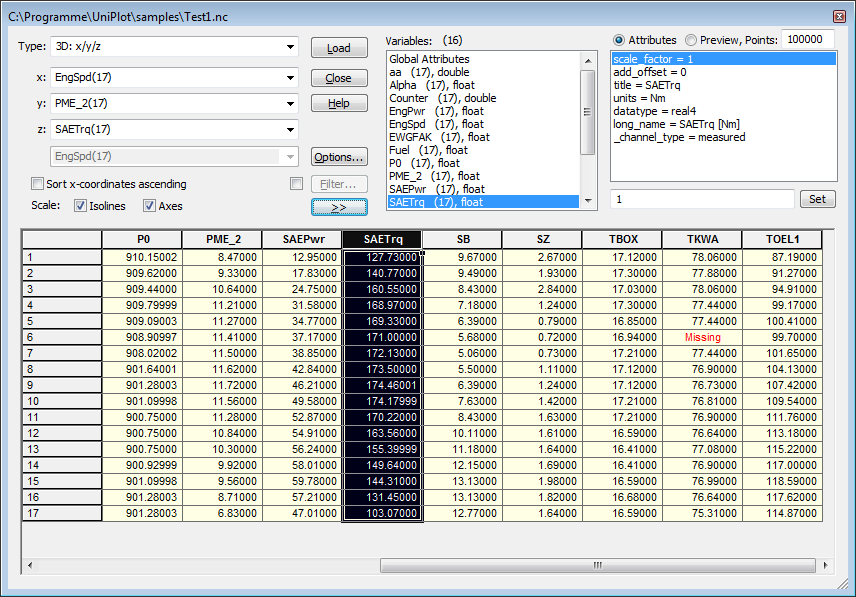
Import dialog after loading a file: channels, attributes and the data in a grid.
How it works
Choose File=>Import Data, select the file type (text, CSV or Excel) and one or more files. Hold Ctrl or Shift to select several files.
UniPlot converts each file into a UniPlot data file (NC2). This is only done the first time; afterwards the converted file opens immediately.
Choose the dataset type, for example 2D: x/y, select the channels for x and y and click Load, or drag the channels into a diagram.
What UniPlot recognizes automatically
Column separator: semicolon, tab, comma or spaces.
Decimal sign: period or comma.
Names and units: one row with channel names and one row with units below it. Comment lines above the data are skipped.
Text and date columns: columns without numbers become text channels, values such as
2007-01-17become date or time channels.Missing values: empty fields and fields such as
*,-,#,nanorno valueare stored as missing values instead of zeros.
Why it helps
Files from almost any data logger or test bench export can be read without writing an import script.
Units are kept and appear in axis titles and legends.
Files with up to 8000 columns are supported; the number of rows is only limited by memory.
Good to know
File=>Import Options sets how axis titles and legend texts are built from channel name and unit, for example
Torque [Nm].If formula channels are configured, they can be calculated during the import.
All rows should have the same number of columns. Missing fields at the end of a row are stored as missing values.
For your own text exports, the UTX format additionally stores attributes, for example the operator for the whole file and a unit for each channel.