

How do I import data files and plot channels from a script?
Two functions do the main work. auto_ImportData() reads a data file in any
format UniPlot supports and converts it into an NC file. auto_LoadDataset()
takes channels from that file and puts them as a curve or a map into a diagram
of the template. Together with auto_LoadTemplate() and
auto_UpdatePage() this is a complete report in a few lines.
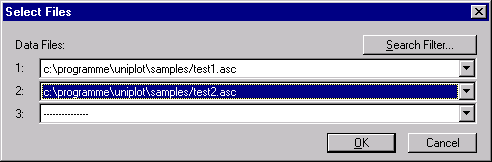
auto_GetFileNameDialog() lets the user choose the data files.
How it works
This example from the UniPlot samples (samples/automate) creates two maps
from the file map-data.xls:
auto_AddToUI("Examples", "Example 1: Map", "RS_Example1");

def RS_Example1()
{
    auto_SetFileNameDialogInit("*.xls", GetRootDirectory() + "samples/");
    svFile = auto_GetFileNameDialog(1);
    if (svFile[1] == "DLG_CANCEL") {
        return;
    }
    auto_LoadTemplate(GetRootDirectory() + "samples/automate/Example.ipw");
    auto_ImportData(svFile[1]);
    auto_LoadDataset("Diagramm 1", "N", "EWGMOM", "EWGLST");
    auto_LoadDataset("Diagramm 2", "N", "EWGMOM", "BEEWG");
    auto_ScaleAxes();
    auto_UpdatePage();
}
auto_GetFileNameDialog(n)asks for up to n files (maximum 16) and returns"DLG_CANCEL"if the user cancels.auto_LoadTemplate()copies a page of the template into a new document and returns the page handle.auto_ImportData()converts the file and returns the NC file name. It also remembers the file for the followingauto_LoadDataset()calls.auto_LoadDataset("Diagramm 1", x, y)creates a 2D curve,auto_LoadDataset("Diagramm 1", x, y, z)a 3D map. The diagram is addressed by its name in the template.auto_UpdatePage()finishes the page.
Why it helps
The same lines work for Excel, text, MDF, and every other format UniPlot can import.
Diagram layout stays in the template, the script only says which channel goes where.
The returned handles can be used for further steps such as calculations, styles or placeholders.
Good to know
Curve styles are taken one after the other from the active style file.
auto_SetDatasetStyle()sets the style for the next curve,auto_LoadStyleFile()loads another style file.A template can have several pages. Call
auto_AddPage()before the nextauto_LoadTemplate()to add a page to the same document.The samples
RS_Example1toRS_Example5insamples/automateshow the next steps: several files, several pages and calculated curves.